Lockbox Loader
Redesigned a tedious multi-hour process of reconciling payments to a short guided flow.
Overview
Role
Product Designer
Duration
6 weeks
Team
CEO, 2 Software Devs, 1 QA
Tools
Figma, FigJam, Jira, Confluence
Intro
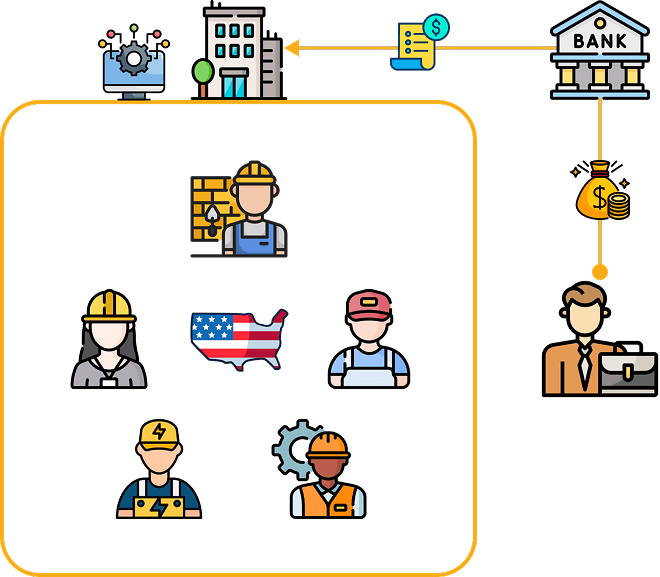
In the U.S., many trade workers are part of unions that negotiate vital benefits like health insurance, pensions, etc on their behalf. The employers of these workers are contractually obligated to pay for these benefits, sending payments directly to a bank that then forwards the financial data in lockbox files to the union fund.
The Viveka Health Benefit Administration System is a B2B SaaS platform that serves as a single source for union staff to manage thousands of members' benefits.
A core function of the system is the reconciliation of payments received in the lockbox file from the bank.
Problem
The previous reconciliation process was a manual, error-prone bottleneck.
Users were forced to type out payment data from bank files into the system one by one for multiple employers, per month, causing a high risk of errors and costing hours of labor. This led to stalled adoption and user frustration.
Challenge
How could I transform a broken, manual process into an automated, trustworthy solution that users would confidently adopt?
Impact
My redesign successfully cut processing time by over 90%, reduced errors, and empowered users to fully adopt the new flow, turning a major business problem into a streamlined, efficient workflow.
Challenge
Imagine a world where your job requires absolute accuracy, yet the tools you use don't actively support you.
This was the reality for a users like remittance processors at our client's union funds. One of their core task was to ensure every dollar and hour from employer payments was accurately recorded so that thousands of union members could receive their benefits.
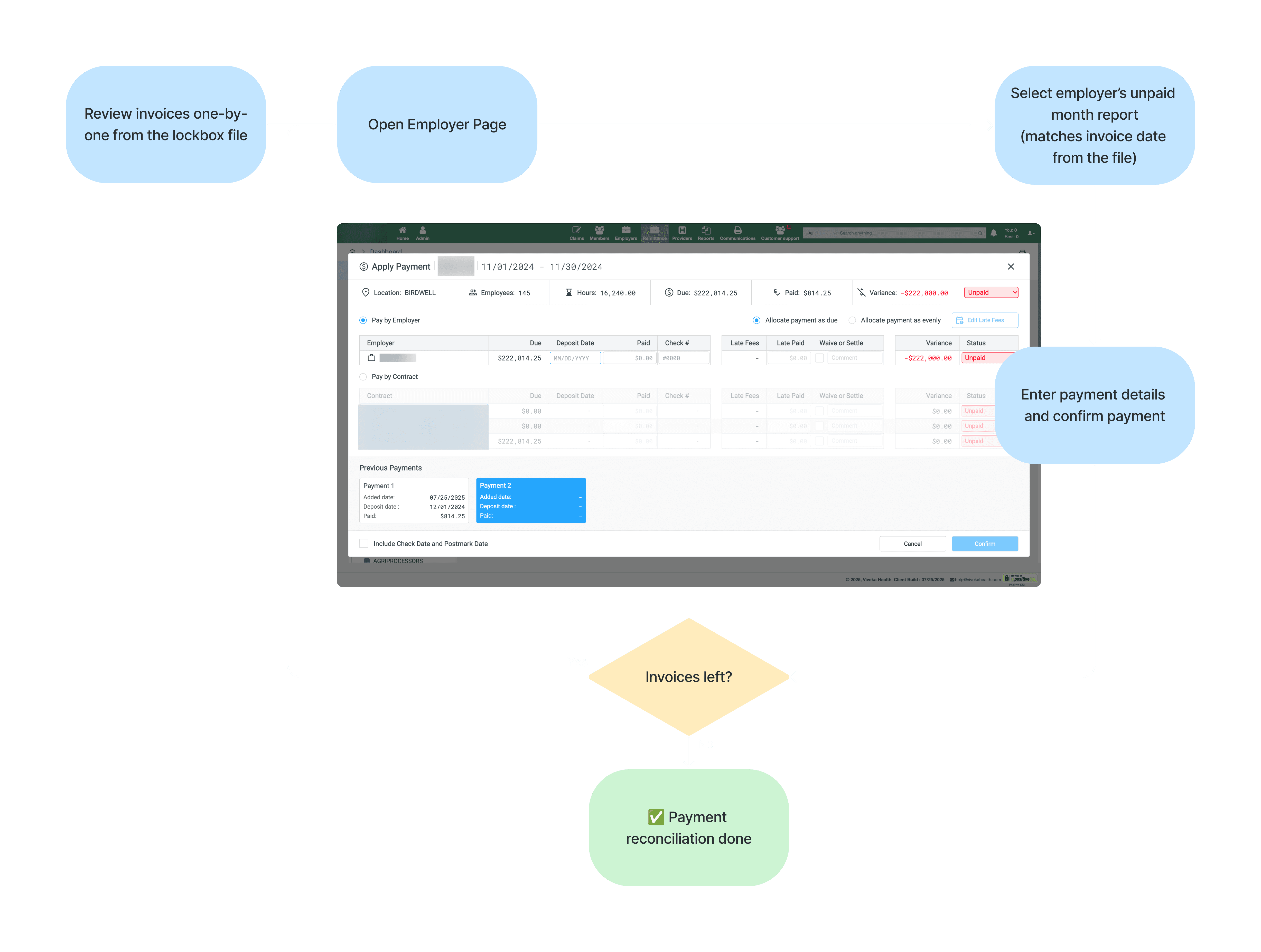
⏳ On a user level, the process was frustrating. The "Apply Payment" modal forced users to transcribe data one-by-one, a tedious task that could take 2-3 hours for a single file.
💰 On a business level, the stakes were high. Errors in this process could cause a member to lose access to their healthcare benefits, creating a serious liability for the union fund and leading to costly customer support calls.
Research
My process began with a deep dive into the user's daily workflow. I conducted direct user interviews with the fund administrator and shadowed a remittance processor, observing their work and frustrations in real-time.
What I set out to understand:
What were their greatest frustrations?
What was their process for payment reconciliation?
What would an ideal process look like for them?
Here’s what I uncovered:
👩🏼 Users were not "tech-innovators"
Often accepted a high level of inefficiency.
◀️ Undo payment feature was used frequently
A clear signal of the high error rate and a high-stakes fear of rework.
😧 Fear of rework
The manual process created a fear of abandoning "work-in-progress" due to the effort required to correct mistakes.
💪🏻 My "aha!" moment came from this direct observation
The central truth for the user was the bank's lockbox file. I discovered that users heavily relied on these files to manually record payment data into the system, yet the files were not integrated into the system's process.
Note: In banking, a lockbox is a secure post office box (P.O. box) used by businesses to receive customer payments. Instead of mail arriving at the business, it is directed to the bank's lockbox, where bank staff collect, open, scan, and deposit the checks directly into the business's account.
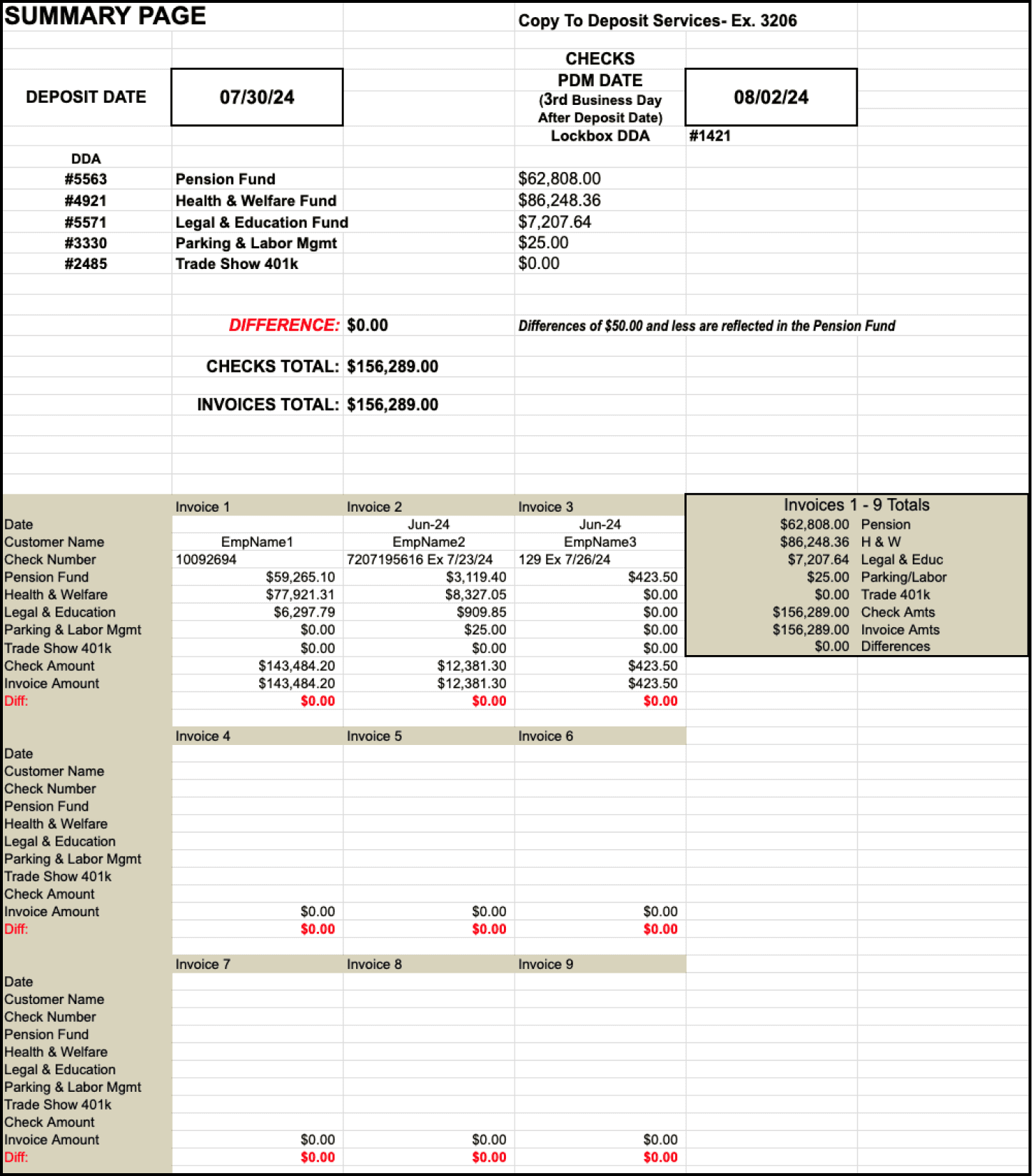
To validate my hypothesis, I took a critical look at the lockbox files themselves. Each file was a collection of invoices from different employers and time periods.
As they came from an external source (bank), I knew system couldn't rely on the data blindly. Upon parsing the files and discussing with users, I noted a few sets of errors that could occur which could require manual intervention.
File formatting errors (e.g., incorrect file types or missing tabs).
Missing critical data on individual invoices, such as employer names or dates of payment.
Calculation discrepancies where individual invoice totals did not match the grand total in the file.
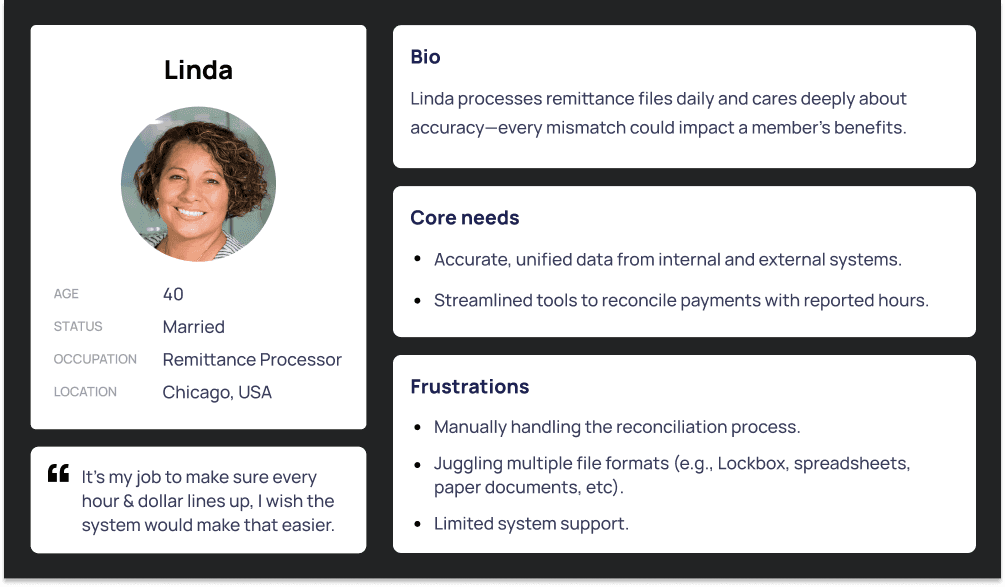
From the research, Linda was born, to humanize the problem and keep the design process focused.
She's not a tech guru; she's a benefits expert.
Her primary motivation is to ensure every dollar lines up, as any mistake could directly impact a member's benefits. Her frustration was rooted in the feeling that the system treated her like a data entry clerk instead of a financial guardian. My design journey was to help Linda overcome these obstacles.
How might we?
reduce the user's manual and repetitive steps in the reconciliation process?
leverage the Lockbox file from the bank to streamline the reconciliation process?
give the user confidence that every dollar is accurately tracked?
Ideation
I worked closely with a PM, devs, and QA to set the scope for the feature. As this was a high priority, we decided to develop an MVP. My ideation was guided by a single goal: to directly tackle the user’s manual, repetitive workflow with an automated solution.
The typical steps a user performed during manual reconciliation were:
Reviewing a lockbox file invoice by invoice.
Matching each invoice to the correct employer account and report in the system.
Manually entering payment amounts into the "Apply Payment" modal while cross-referencing with the lockbox file.
This process was repeated for every single invoice. My design strategy was to automate these repetitive steps, requiring user intervention only for exceptions.
As an example, if a file contained an invoice for "Google" for a total of $10,000, my design would now automatically process that payment. The user would not see it unless there was an exception, like an underpayment of $1,000.
The system would then stop and present the user with a focused screen, showing a variance of -$1,000. Here, the user could reallocate funds through any available positive variance from another fund, or simply proceed without any action on the underpayment.
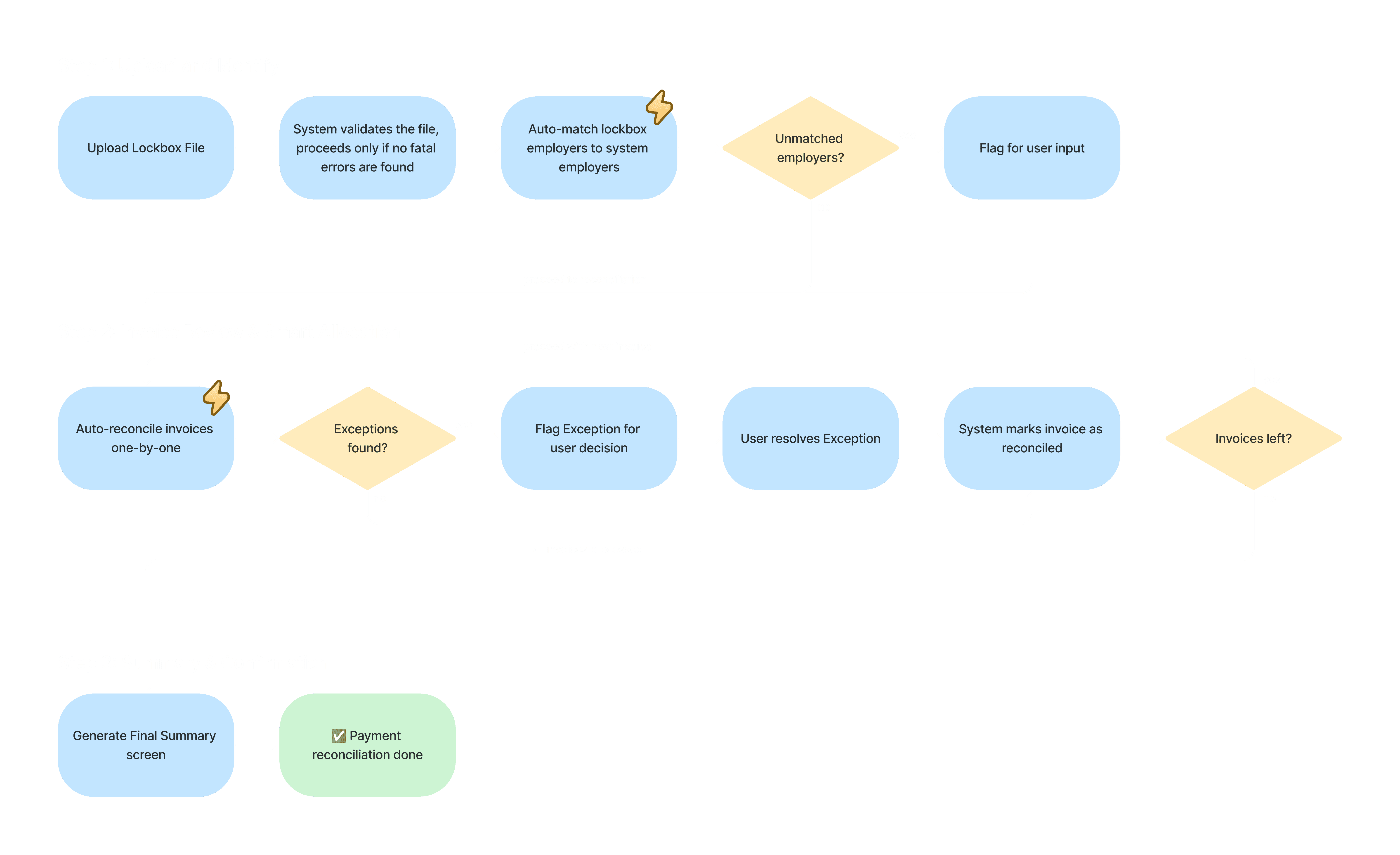
Based on this high level user flow, I began my design explorations process.
Design Solutions
My final solution was the result of a multi-iterative design process that addressed the key pain points identified in my research. I pursued three distinct design explorations, with each iteration building on user feedback.
Step 1: Upload and Identify
Once a user uploads the lockbox file, the system automatically matches employers from the file to existing accounts. The Employer Exceptions Screen is then presented, which flags any employers the system couldn't confidently match due to typos or different naming conventions, requiring user input.
Iteration 1
The initial design suffered from poor space management. For files with many employer invoices, expanding the accordion resulted in a long scroll and data getting hidden behind the summary bar.
At the same time, since the summary bar was at the very bottom, it was frequently overlooked by the user. This created friction and degraded the overall user experience.
Iteration 2
To solve these problems, I moved the summary to the top of the modal so users would immediately see this crucial information from the lockbox file. I also addressed the space issue by introducing a tabbed interface. This change allowed users to easily switch between the "Unidentified" and "Matched" categories, effectively reusing UI space, avoiding any information being hidden, and eliminating the need for excessive scrolling within the modal.
Iteration 3
A significant issue was identified in a real-world scenario: while the system could identify near-match cases, the UI lacked a way to display them clearly. As a result, "near-match" cases like "1110 N Lake Shore" were incorrectly grouped with truly unidentified employers, forcing the user to do the tedious legwork of manual matching.
To solve this, I introduced a new "Uncertain" tab. The system now flags these employers for review, providing a visual cue to the user that a review is needed while eliminating the tedious manual search. The system also remembers user-made matches to eliminate the need for manual input on future uploads, making the system smarter over time.
Step 2 - Invoice Review & Smart Allocation
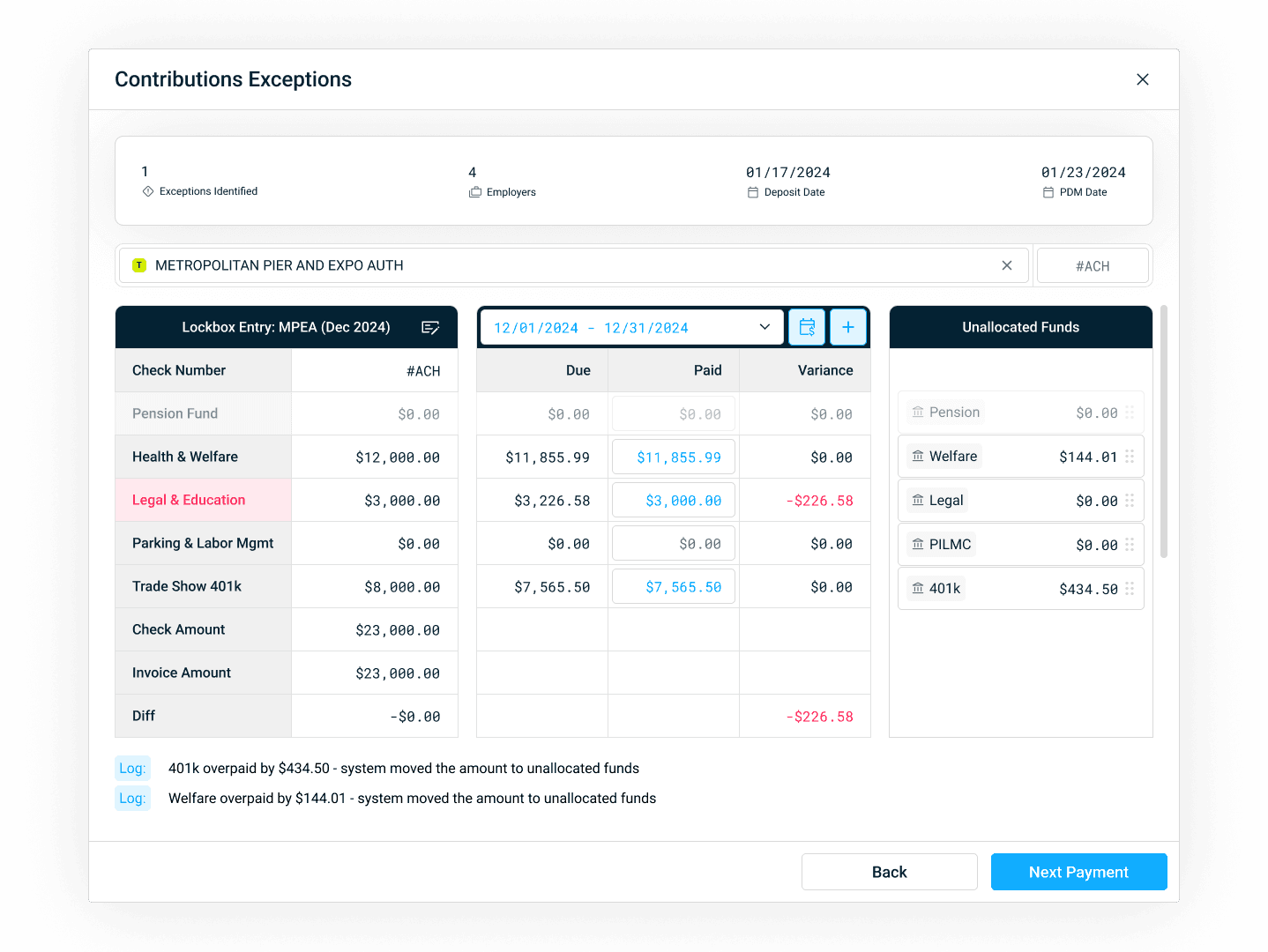
The system now automatically matches invoices in the file to the due reports of the respective employers for payment reconciliation. The Contributions Exceptions Screen is shown when the system flags invoices with financial discrepancies, such as an underpayment or overpayment of a fund, requiring user review before a final reconciliation.
Iteration 1
This initial design presented challenges for the user. It provided too many options in the header and hid crucial payment data from file behind a hover state, forcing the user to dig for information. The horizontal layout, which placed "Due," "Paid," and "Variance" one below another, did not align with the users' mental model of a spreadsheet and made it difficult to compare amounts at a glance.
Additionally, when a user would reallocate funds (e.g., deducting an overpayment from the Health Fund to cover an underpayment in the Pension Fund), a "temporary" tab would appear below the table to hold the reallocated money. Users did not respond positively to this and found it easy to miss.
Iteration 2
I addressed the layout problem by changing the orientation of the table to a simple, side-by-side columnar view. This new layout mirrored a spreadsheet, a format the users were already comfortable with, making it easy to compare amounts.
I also added a dedicated column for unallocated funds, giving the user a clear understanding of where temporary funds were being held.
It was during user testing of this exploration that a new problem was identified: for overpayments from a fund to appear in the unallocated column and become available to be applied on underpayments, the user needed to manually edit the paid amount first which could become a repetitive action.
Iteration 3
The final iteration of my design focused on ultimate clarity and trust. To address the issue identified in Exploration 2, my design now automatically showed overpayments in the unallocated funds column, eliminating the need for the user to manually edit the paid amount first.
I simplified the header by removing unnecessary controls and made the labels more readable, ensuring the user would instantly know which data belongs to what. I also improved the logs to clearly state which actions were automated by the system and which were done by the user, providing full transparency and traceability.
Step 3 - Summary & Confirmation
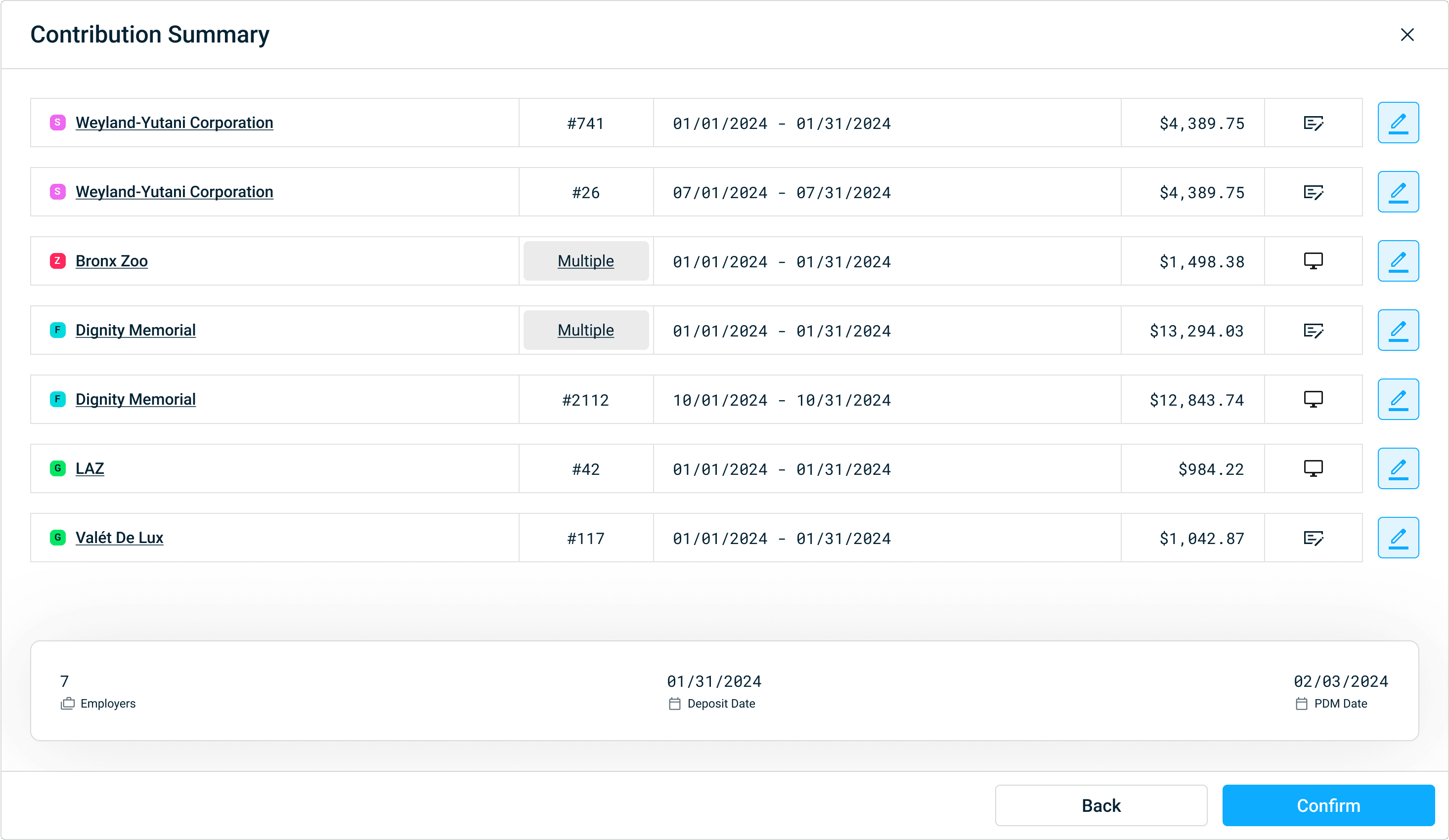
Contribution Summary screen provides the user with a final, high-level overview of all the payments that will be reconciled and updated in the system. It is a critical step that builds trust by giving the user a chance to review both the system's automated work and their own manual inputs before a final confirmation.
Iteration 1
The initial design was a straightforward list of all payments. For convenience, it attempted to combine multiple checks from the same employer into a single row. However, during user testing, this did not have a positive response. Users wished to review these payments in the same order as they appeared in the original lockbox file to perform a quick last-minute check.
Iteration 2
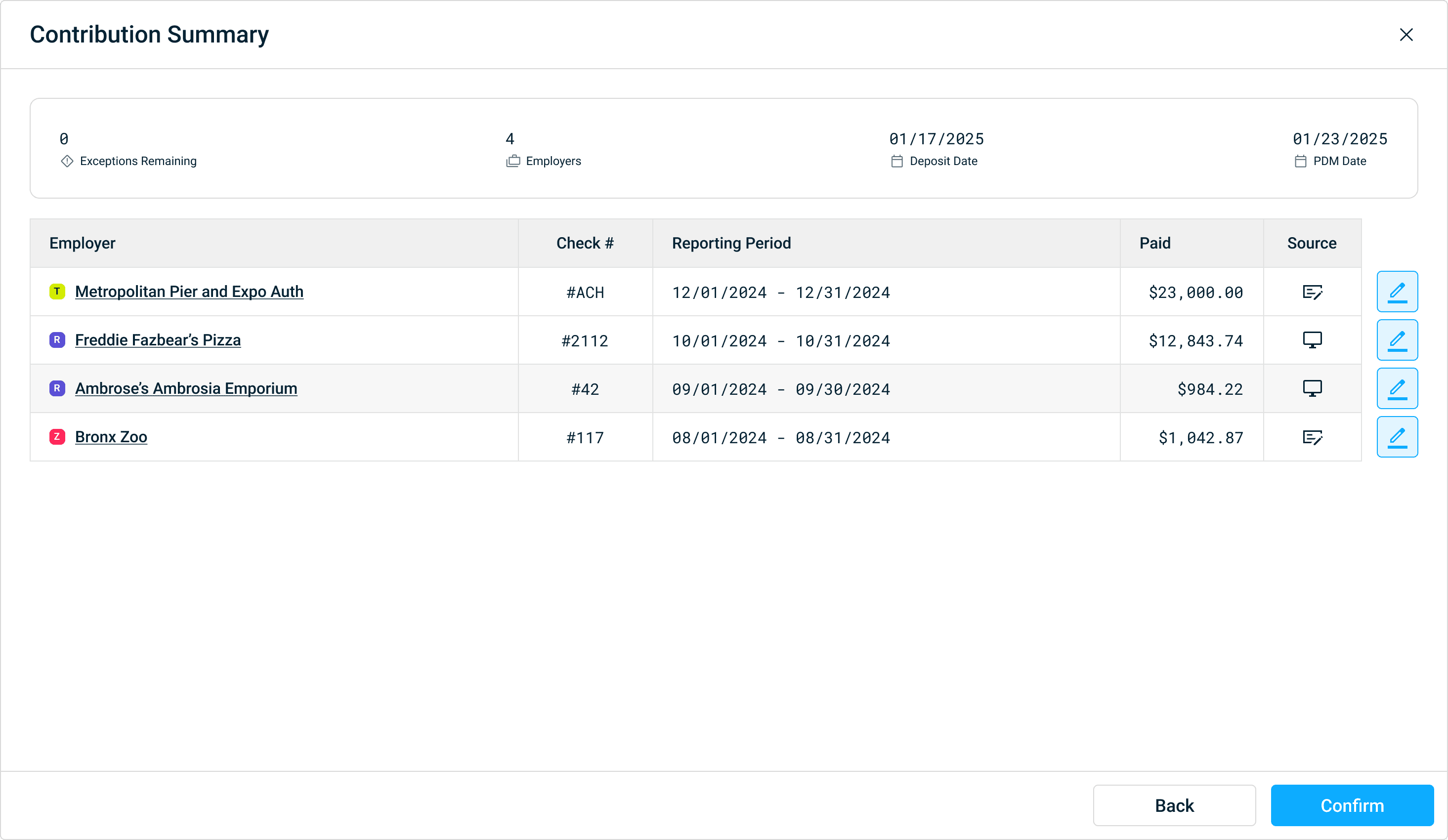
To address the feedback from Exploration 1, I refined the design to adhere to a core user need: alignment with reality. My design now preserved the original payment order from the lockbox file.
To maintain consistency with other screens and provide crucial information at the top, the summary bar was placed at the top. These crucial changes successfully met our users' needs.
Final Design and Handoff
My design journey culminated in a refined solution that seamlessly moved the user from a manual, one-by-one process to a proactive, exception-based workflow. The final design was built for clarity, trust, and efficiency, addressing every pain point identified in my research.
Below is a full walkthrough of the final, interactive prototype.
I collaborated closely with the engineering team to ensure the feature was built to spec and aligned with the user-validated workflow. I created a comprehensive design specification and documentation, detailing user flows, states, edge cases, and UI logic.
This ensured a smooth handoff and a high-fidelity final product.
Reflections
💪🏻 Startup culture taught me to prototype rapidly and stay resourceful.
🫂 Gained proficiency in ideating with product managers.
🎨 Maintained and contributed to an enterprise SaaS software's design system.
✨ Reinforced the importance of a user-centered approach.
What I'd do differently
⚡️ Accelerate the initial ideation process by leveraging AI.
👥 Test with more clients to ensure scalability in the future.
✨ Implement a robust feedback loop with clients post-launch.